Voice-led HIIT & Tabata timer
It calls out every exercise and counts you down, so you can train without looking at the phone.
Coming to iPhone and Android
Say the change, see what moved
Hold the mic and say it: “swap plank for mountain climbers and make the rest fifteen seconds.” The rows that changed light up and show what they were, and one tap undoes it.
Free has three tries so you can hear how it works. Voice editing is part of the subscription.

Built for training with your eyes off the screen
It talks, you train
Every exercise is called out before it starts, with a countdown into each change. Your music keeps playing and dips while the voice speaks (a setting you can switch off); podcasts and audiobooks pause instead.
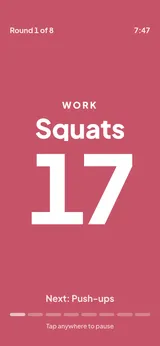
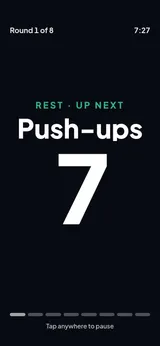
One giant number, one colour per phase
The running screen is one giant number, in a different colour for each phase. Tap anywhere to pause; ending a workout takes a press and hold, so a sweaty finger cannot quit by accident.
Two taps to start
The home screen already knows which workout you mean. Classic Tabata, 20 seconds on and 10 off for 8 rounds, is one tap, and there is nothing to sign up for.
Your own rounds
Set work, rest, rounds and sets, give every round its own rest, and save circuits with named exercises.
Keeps going with the screen locked
Time left and a pause button sit on the lock screen, on Android and on iPhone with iOS 17 or later. On Android, the earbud buttons pause the timer when no music is playing.
Running a class? Put the phone down.
Play it through a speaker and everyone hears the next move: “Next: kettlebell swings.” Keep as many workouts as you need and run them without ads in front of your group. Both paid plans do that.
Building the circuit by talking, on the walk to the park, is part of the subscription. Lifetime gets the same three free tries as Free.

Start free, pay only if you want more
With ads
Free
- The full quick timer, with Classic Tabata one tap away
- Two saved workouts
- Three tries at voice editing
- A banner on the home and workouts screens, and a video after a finished workout: never during one
One purchase
Lifetime
- No ads
- Unlimited saved workouts
- Everything that runs on your phone
For voice
Subscription
- No ads
- Unlimited saved workouts
- Build and edit workouts by voice
Questions
When can I get it?
Countcall is coming to iPhone and Android. Join the waitlist and we will email you once, on the day it launches.
Is it free?
There is a free plan with ads. A one-time purchase removes the ads and lifts the limit on saved workouts, and a subscription adds building and editing workouts by voice.
Do I need an account?
No. Open it and press Start. Your workouts and history stay on your phone.
Does it work with my music?
Yes. Your music keeps playing and dips while the voice speaks (a setting you can switch off); podcasts and audiobooks pause instead. With music playing, your earbud buttons control the music, so pause from the lock screen (on Android, and on iPhone with iOS 17 or later). On Android, with no music playing, the earbud buttons pause the timer.
Is my voice recorded?
Your voice is turned into text on your phone, and the sound never leaves it. When you change a workout by voice, the text and the workout go to our server and to Anthropic, which makes the edit. The privacy page has the details.
Is it only for Tabata?
No. It is an interval timer: you choose the work and rest times, the rounds and the sets, and Classic Tabata is one preset of many.
Guides
- Bootcamp timer: run a class from one phoneHow to run a bootcamp or circuit class from one phone and a speaker: choosing the intervals, music, cues, and what to test before the first class.
- How long at each station? Circuit timing guideHow long to spend at each circuit station: a table by class length and station count, rest between stations and rounds, and group rotation timing.
- HIIT timer 40/20 vs 45/15 vs 30/30: pick oneWhich HIIT work and rest ratio should you set? What the research says about 20/10 and 30/30, why 40/20 and 45/15 are coaching habits, and how to choose.
- An interval timer that works with SpotifyYes, an interval timer can run alongside Spotify or Apple Music. Here is what to look for, a 30-second test, and how to set volumes so cues are heard.
- How to set an interval timer on iPhone or AndroidSet repeating work and rest on an iPhone or Android phone: what the built-in Clock can and cannot do, and two worked examples with exact timings.